ZUMWALT P7 15.
6-inch Laptop Screen Extender review : this portable dual-screen accessory is built for people who want a faster, less cramped workflow.
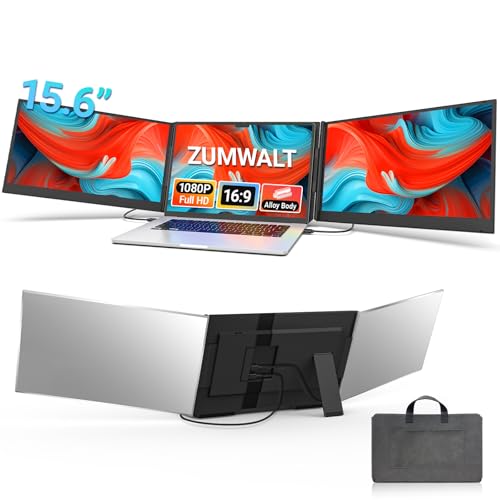
ZUMWALT P7 Extender Review Summary
If you spend your day bouncing between spreadsheets, email, browser tabs, documents, and chat apps, the ZUMWALT P7 15.6-inch Laptop Screen Extender can be a genuine productivity upgrade.
It is especially appealing for remote workers, frequent travelers, coders, analysts, and presenters who want more screen space without sacrificing portability.
What makes the ZUMWALT P7 stand out is its focus on practical multitasking rather than gimmicks.
Two 15.6-inch FHD panels, extend/mirror/portrait modes, and a slim aluminum shell make it one of the more serious laptop screen extender concepts for buyers who need a true mobile workstation.
The catch is compatibility: some laptops get the simple plug-and-play experience, while others need extra cabling, power, or driver steps.
Scorecard
| Category | Score | Takeaway |
|---|---|---|
| Screen expansion and multitasking | 9.0 | Adds two 15.6-inch displays for a triple-screen workspace and significantly reduces tab switching. |
| Display quality | 8.0 | 1080p FHD, 280 nits, 16:9, and 178° viewing angles make it well suited to work and presentations. |
| Portability | 8.0 | At 4 lbs with a carry bag and aluminum shell, it is travel-friendly for a dual-panel accessory. |
| Setup simplicity | 7.0 | Often plug-and-play, but some laptops need extra cables, external power, or drivers. |
| Compatibility | 6.0 | Works with many systems, but some MacBook and USB-C setups need additional steps. |
| Build and durability | 8.0 | High-grade aluminum alloy and a clip-free design feel sturdy and travel-ready. |
| Versatility | 8.0 | Extend, mirror, and portrait modes make it flexible for work, collaboration, and presentations. |
Bottom line: the ZUMWALT P7 is a smart buy if you value workflow efficiency and can confirm compatibility first.
If your laptop setup is suitable, it offers one of the most compelling portable triple-screen experiences in this category.
Key Features and Specifications of ZUMWALT P7 Extender
The ZUMWALT P7 15.6-inch Laptop Screen Extender is designed around a simple goal: give laptop users the kind of multitasking space that usually requires a desk and external monitors.
Below are the core specs and features that matter most to buyers.
| Spec | Details |
|---|---|
| Brand / Model | ZUMWALT / P7 |
| Screen size | Two 15.6-inch panels |
| Resolution | FHD 1080p |
| Aspect ratio | 16:9 |
| Screen surface | Glossy |
| Brightness | 280 nits |
| Viewing angle | 178° |
| Compatibility | 13-inch to 17.3-inch laptops |
| Supported systems | Mac, Windows, Chrome, Switch |
| Build | High-grade aluminum alloy shell |
| Weight | 4 lbs (1.8 kg) |
| Display modes | Extend, mirror, portrait |
| Connection options | USB-C to USB-C; H5-T + HDMI + USB-A for some devices |
| Setup | Plug-and-play in supported setups; driver required for some configurations |
| Included accessories | Cables, power adapter, carrying bag |
These specifications point to a product aimed at productivity first.
The 1080p resolution is not trying to wow home-theater buyers; it is meant to keep text readable, browser windows sharp, and documents easy to manage.
The 280-nit brightness is solid for indoor work and typical hotel, office, or home setups, while the 178° viewing angle helps the side panels remain usable when you are not sitting perfectly centered.
The aluminum construction is another meaningful choice.
A lot of portable monitor accessories feel plasticky or delicate, but the ZUMWALT P7’s shell and clip-free design suggest a stronger focus on daily travel and repeated setup.
The inclusion of a carry bag, cables, and power adapter also matters because it lowers the number of extra items you need to hunt down before first use.
Pros and Cons of ZUMWALT P7 Extender
Here is the clearest ZUMWALT P7 15.6-inch Laptop Screen Extender pros and cons breakdown for real-world buyers.
| Pros | Cons |
|---|---|
| Creates a productive triple-screen workspace | Not every laptop can use the simplest USB-C setup |
| Portable enough for travel and remote work | Some MacBook and non-full-feature USB-C users need extra cables and drivers |
| Slim aluminum design feels premium and durable | At 4 lbs, it is portable but not ultra-light |
| Good display specs for productivity and presentations | Glossy screens can reflect more light in bright rooms |
| Multiple display modes add flexibility | Some configurations may need external power |
| Package includes many needed accessories | Compatibility checks are important before buying |
The biggest strength is obvious: more screen space means less context switching.
The biggest drawback is equally important: the experience is not equally simple for every laptop owner.
If you are the type of buyer who wants a one-cable accessory to work flawlessly on every machine, this is not the safest blind buy.
How the Triple-Screen Setup Changes Workflow
The core reason to buy the ZUMWALT P7 15.6-inch Laptop Screen Extender is the workflow change.
Two side displays can turn a standard laptop into a much more capable mobile workstation, and that matters more than raw specs for most shoppers.
For example, one screen can hold your main document or code editor, the second can handle research or reference material, and the third can keep Slack, email, or dashboards visible.
That layout is especially valuable for coding, accounting, data entry, stock monitoring, content creation, and sales work.
You spend less time alt-tabbing and more time actually working.
In presentations and collaboration, the extra space also helps.
You can mirror content for a client while keeping notes visible, or use portrait mode to show long documents and web pages with less scrolling.
That kind of flexibility is exactly what separates a good laptop extender from a novelty accessory.
If you are comparing the ZUMWALT P7 review results against a simple portable monitor, the decision often comes down to whether you want one extra display or a real productivity ecosystem.
A single portable monitor is easier to manage, but it does not deliver the same multi-app efficiency as a dual-panel extender.
Compatibility With Mac, Windows, Chrome, and Switch
Compatibility is the most important buying factor in any laptop screen extender, and it is also where buyers should be careful with the ZUMWALT P7.
It supports Mac, Windows, Chrome, and Switch, and it works with laptops from 13 inches to 17.3 inches.
That is a broad range, but it still depends on the right ports and signal support.
In the best-case scenario, you can use two USB-C to USB-C cables and enjoy a clean, low-clutter setup.
In other cases, especially when a laptop does not have a full-function USB-C port, you may need the H5-T cable path with HDMI and USB-A, plus external power.
Some setups also require driver installation.
MacBook users should pay extra attention. The product brief specifically notes that some MacBook M1, M2, and M3 users may need the H5-T route and additional steps.
That does not make the product a bad fit for Apple laptops, but it does mean you should verify your exact model before buying.
The same caution applies to Chromebooks and laptops with limited USB-C output.
The practical takeaway is simple: check your laptop’s port capabilities first.
If your machine supports the preferred setup, the ZUMWALT P7 becomes a much more appealing option.
If not, you could still use it, but the accessory will feel less elegant and more dependent on adapters and setup work.
What’s in the Box and How It Connects
A strong portable accessory should reduce friction right out of the box, and the ZUMWALT P7 does a respectable job here.
The package includes the necessary cables, a power adapter, and a carrying bag, which means many buyers will have what they need to get started without buying a pile of extras.
- Two integrated 15.6-inch screen panels
- Required connection cables
- Power adapter
- Leather carry bag
For supported laptops, the connection process is meant to be largely plug-and-play.
That matters because a screen extender should save time, not create a mini IT project.
In more complex configurations, the need for a driver or alternate cable path is not unusual in this category, but it still affects ease of use.
The upgraded internals aimed at reducing cable clutter are a smart design choice.
They do not eliminate every cable in every scenario, but they should help the desk and travel setup feel cleaner than older, messier multi-monitor solutions.
Display Quality, Brightness, and Viewing Angles
For productivity gear, display quality needs to be judged by usability rather than marketing language.
On that front, the ZUMWALT P7 is well chosen for office work.
The twin 15.6-inch panels use 1080p FHD resolution, a 16:9 aspect ratio, and 280 nits of brightness, which is a sensible combination for text, windows, spreadsheets, and presentations.
The 178° viewing angle is useful because it lets the side panels remain legible even when you shift position or angle the laptop slightly.
That is a bigger deal than many buyers realize, especially on a travel accessory that may be used in cramped train seats, coffee shops, or hotel desks.
The glossy surface is a mixed bag.
It can make colors look a bit more vibrant, but it also means glare can show up under office lights or near windows.
If you work in bright environments, that is one of the main tradeoffs to understand.
For indoor productivity, though, the overall display package is good and should feel more than adequate for the category.
For presentations, remote collaboration, and multitasking, the panels are strong performers. For color-critical creative work, a professional standalone monitor will still be a better tool.
Travel Use, Weight, and Carry Case Impressions
Portability is one of the ZUMWALT P7’s biggest selling points, but it should be understood in context.
At 4 lbs (1.8 kg), it is absolutely portable for a dual-screen extender, yet it is not something you would call featherweight.
If you already travel with a laptop, charger, mouse, and notebook, this adds meaningful bulk to your bag.
That said, the tradeoff makes sense if you actually use the screens.
The slim aluminum shell, the included carry bag, and the clip-free design all make the unit easier to pack, install, remove, and reattach.
The lack of a top baffle or clip is especially appealing for buyers who want a cleaner physical fit around the laptop lid area.
Travel-friendly does not mean invisible, but the ZUMWALT P7 is sensible for people who work on the move often enough to justify a more serious productivity accessory.
If you only travel occasionally, a smaller portable monitor might be easier to live with.
If you are constantly moving between workspaces, the extra screen real estate can be worth the added load.
Best Alternatives to Consider
If you are not fully sold on the ZUMWALT P7, a few alternatives are worth comparing before you buy:
- portable USB-C monitor — best if you want a simpler single-screen expansion and fewer compatibility concerns.
- single-screen laptop monitor extender — a more compact option for buyers who need just one extra display.
- triple-screen laptop extender — useful if you want to compare similar form factors from other brands.
- portable dual monitor for laptops — worth considering if you prefer separate external displays over a hinged extender design.
- docking station with external monitors — better for a semi-permanent desk setup than a mobile travel workflow.
Compared with these options, the ZUMWALT P7 15.6-inch Laptop Screen Extender makes the most sense when you want maximum screen space in a laptop-first form factor.
If simplicity matters more than raw productivity, a single portable monitor may be the better value.
Who Should Buy ZUMWALT P7 Extender?
The ZUMWALT P7 is a strong fit for buyers who need a serious productivity boost from a laptop without switching to a full desktop setup.
It is especially good for:
- Remote workers who live in email, docs, and video calls
- Traveling professionals who need a mobile workstation
- Coders and analysts who benefit from multiple windows at once
- Students and researchers juggling notes, sources, and assignments
- Presenters and consultants who want flexible display modes
You should also consider it if you already know you work better with multiple displays and want that capability to follow you from office to home to hotel room.
In that sense, the ZUMWALT P7 15.6-inch Laptop Screen Extender is for productivity-minded buyers first.
Who should skip it?
Buyers who want the lightest possible setup, users who are unsure about USB-C support, and anyone who wants a guaranteed plug-and-play experience across every laptop model.
If you are especially sensitive to glare, the glossy finish may also push you toward a matte alternative.
Is ZUMWALT P7 Extender Worth It?
So, is ZUMWALT P7 15.6-inch Laptop Screen Extender worth it?
For the right buyer, yes.
It delivers a legitimate triple-screen workflow, respectable display quality, and a travel-ready build that feels designed for real work rather than just spec sheet appeal.
The value is strongest when you will actively use the extra screen space every day.
If your job or study routine involves constant multitasking, the time saved by reducing window switching can easily justify the purchase.
The included accessories, aluminum build, and flexible display modes further strengthen the case.
However, the product is only a smart buy if compatibility checks go well.
If your laptop lacks a full-function USB-C port or you are uncomfortable with extra cables and possible driver steps, the experience may feel less seamless than you hoped.
That is the main reason to slow down before clicking buy.
Final verdict: the ZUMWALT P7 is worth it for productivity-focused laptop users who want real screen expansion in a portable format.
If you need a mobile triple-monitor solution and your device matches the connection requirements, this is a compelling option to shortlist.