The Zerfis 14-inch Laptop Screen Extender review is all about portable productivity.
If you want a true second screen that travels with your laptop, this one makes a strong case.
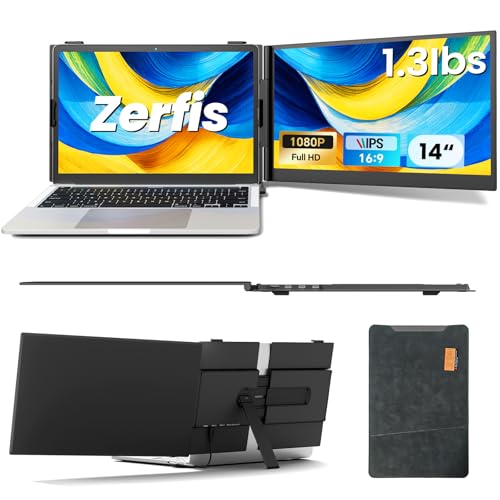
Zerfis Extender Review Summary
The Zerfis 14-inch Laptop Screen Extender is best for buyers who need more workspace on the move, not just a casual accessory for occasional use.
It adds a compact 14-inch Full HD screen, keeps the setup lightweight enough for travel, and gives you multiple display modes that can genuinely improve multitasking for work, study, design, and collaboration.
What makes it appealing is the balance between portability and productivity.
With a 0.17-inch profile, 2.2 lb weight, 300 nits brightness, 100% sRGB coverage, and support for extended, mirrored, duplicate, portrait, and landscape modes, this extender is clearly built for users who want a more capable mobile workstation.
That said, this is not a buy-it-and-forget-it accessory.
Port compatibility matters, some setups may need driver installation, and the glossy panel may reflect light in bright rooms.
If your laptop has the right ports, though, the Zerfis 14-inch Laptop Screen Extender can be a very smart buy.
Quick Scorecard
| Category | Score | Why It Matters |
|---|---|---|
| Portability | 9.0 | Ultra-thin 0.17-inch design and 2.2 lb weight make it easy to carry for mobile work. |
| Display quality | 8.0 | 14-inch Full HD 1080p panel with 300 nits brightness, 100% sRGB, 178° viewing angle, and anti-glare/low blue light features. |
| Multi-screen productivity | 9.0 | Supports extended, mirrored, duplicate, portrait, and landscape modes for triple-screen workflows. |
| Compatibility | 8.0 | Designed for 13-inch to 17-inch laptops and also works with smartphones, gaming consoles, and major operating systems, though some setups require specific ports or drivers. |
| Setup convenience | 7.0 | Plug-and-play use is emphasized and cables are included, but certain connections depend on dual USB-C support or HDMI plus external power and may require driver installation. |
| Build and stability | 8.0 | Aerospace-grade aluminum housing, reinforced adjustable stand, anti-slip hooks, and rotating screen are intended to improve durability and stability. |
| Eye comfort | 8.0 | Anti-glare coating and low blue light support make it more comfortable for longer viewing sessions. |
Bottom line: this is a strong pick for mobile professionals who value a portable dual- or triple-screen setup more than a traditional monitor.
It is most compelling when used with a compatible modern laptop and a workflow that truly benefits from extra screen real estate.
Key Features and Specifications of Zerfis Extender
The Zerfis Extender is built around a simple idea: turn a laptop into a portable multi-monitor station without making the bag too heavy.
The hardware choices support that goal well.
| Specification | Details |
|---|---|
| Brand | Zerfis |
| Screen size | 14 inches |
| Resolution | 1920 x 1080 (Full HD) |
| Aspect ratio | 16:9 |
| Screen surface | Glossy |
| Thickness | 0.17 inches |
| Weight | 2.2 lbs |
| Brightness | 300 nits |
| Color gamut | 100% sRGB |
| Viewing angle | 178 degrees |
| Compatibility | 13-inch to 17-inch laptops; smartphones; gaming consoles; major operating systems |
| Modes | Extended, mirrored, duplicate, portrait, landscape |
| Material | Aerospace-grade aluminum |
| Included accessories | Cables; premium leather protective case |
| Warranty | 12 months |
From a buyer’s perspective, three specs stand out immediately: the 1080p resolution, the 300 nits brightness, and the 100% sRGB color gamut.
Together, those numbers suggest a screen that is suitable for office work, browsing, spreadsheets, light content creation, and general media use.
The 14-inch size is also smart.
It is large enough to add meaningful workspace, but not so large that it overwhelms a laptop lid or becomes awkward in transit.
For people who already work from cafes, client sites, co-working spaces, or hotel rooms, that balance matters a lot.
The included leather protective case is another practical touch.
Portable monitors and extenders often get scratched in transit, so a case helps justify the product as a travel-first tool rather than a desk-only accessory.
Important buying note: the extender is designed for specific connection scenarios, so the advertised compatibility should be treated as broad but not universal.
The best results will come from checking your laptop ports before ordering.
Pros and Cons of Zerfis Extender
Here is the clearest breakdown of the Zerfis 14-inch Laptop Screen Extender pros and cons from a buyer’s point of view.
Pros
- Highly portable for a screen extender, with a slim 0.17-inch profile and 2.2 lb weight.
- Sharp Full HD panel that should look clean for productivity tasks and everyday multimedia.
- Multiple screen modes support real workflow flexibility, including portrait orientation for documents and coding.
- Stable physical design with anti-slip hooks, adjustable stand, and 180° rotation.
- Eye-comfort features like anti-glare technology and low blue light support.
- Broad device support for laptops, smartphones, and gaming consoles.
- Premium-feeling materials with aerospace-grade aluminum and a protective case included.
Cons
- Port setup is not equally simple for every laptop; some users will need dual USB-C support, HDMI, or external power.
- Driver installation may be required in certain connection scenarios.
- Glossy screen surface can pick up reflections in bright environments.
- Compatibility may vary by device, even if the listing sounds broadly flexible.
- More cables and more planning than a basic single-cable monitor in some setups.
The pros are especially strong for mobile productivity, while the cons mostly center on setup complexity and display reflections.
That is a fair tradeoff for a device designed to add a second or even third screen on the go.
Who Should Buy Zerfis Extender?
The Zerfis Extender makes the most sense for people who actively feel limited by a single laptop display.
If you routinely bounce between email, documents, browser tabs, messaging apps, and creative tools, the extra screen space will feel useful fast.
- Remote workers who need a portable workstation for travel or hybrid office use.
- Students who research on one screen while writing notes or papers on another.
- Designers and content creators who want a compact extra display for timelines, palettes, reference work, or tool panels.
- Business travelers who need to maintain productivity in hotels, airports, or client meetings.
- Multi-taskers who prefer a monitor-like experience without carrying a full external display.
Who should skip it? Buyers with older laptops, limited ports, or no interest in managing cables and connection rules may be happier with a simple portable monitor or a conventional desktop screen.
If you only need a second display occasionally, this may be more device than you really need.
How the Triple-Screen Setup Works
One of the main selling points of the Zerfis 14-inch Laptop Screen Extender is the ability to create a true multi-screen workflow.
In practical use, that means you can keep your main laptop display for primary work while using the extender as a dedicated side panel for chat, calendar, editing tools, documents, or dashboards.
The screen supports extended, mirrored, duplicate, portrait, and landscape modes.
That range matters because different buyers use extra screens differently.
A spreadsheet-heavy user may want landscape mode, while a coder, writer, or document reviewer may like portrait mode for long vertical pages.
Mirror mode is useful for presentations, and duplicate mode can help in collaborative or classroom settings.
The biggest productivity advantage is not just “more screen.” It is better task separation.
When your browser, inbox, and working file are all visible at once, you spend less time switching windows and more time doing actual work.
That is why screen extenders are often more valuable than people expect.
For anyone considering a laptop screen extender for remote work, the Zerfis 14-inch Laptop Screen Extender review stands out because the workflow benefits are easy to understand and the hardware supports a genuinely portable setup.
Compare the Zerfis 14-inch Laptop Screen Extender on Amazon
Port Requirements and Compatibility Tips
This is the section where many buyers need to slow down.
The Zerfis 14-inch Laptop Screen Extender can look broadly compatible on paper, but your actual experience depends on your laptop’s port layout and power delivery support.
The listing mentions a few connection paths: two fully functional USB-C ports, a USB-C plus HDMI plus external power adapter arrangement, and another setup for laptops without a fully functional USB-C port that may require driver installation.
That flexibility is good, but it also means you should verify your exact hardware before buying.
Best-case scenario: a modern laptop with the right USB-C implementation, making setup relatively smooth and portable.
More cautious scenario: an older machine or a port-limited laptop that still works, but with extra cables, power requirements, or drivers involved.
For buyers, the main decision factor is not whether the extender is good in general.
It is whether your specific laptop can support the intended connection mode.
If you are using a recent Windows laptop, MacBook, or a mainstream business notebook, chances are better than average.
If your device is older or unusual, check first.
Display Quality for Work and Travel
Display quality is a major reason to consider the Zerfis 14-inch Laptop Screen Extender instead of a cheaper no-name screen accessory.
A 14-inch Full HD panel at 1920 x 1080 is a sensible resolution for this size, giving you enough sharpness for spreadsheets, documents, browser tabs, and light visual work without making text feel cramped.
The listed 300 nits brightness is solid for indoor use, though not ideal for direct sun.
The 100% sRGB color coverage is important for users who care about reasonably consistent color, whether for design work, photo sorting, or even just better-looking media playback.
A 178-degree viewing angle also helps if you frequently share your screen with coworkers or classmates.
The tradeoff is the glossy screen surface.
Glossy panels often look punchier in controlled lighting, but they also reflect light more easily.
If you work under bright office lamps, by a window, or outdoors, glare may become noticeable.
That is where the anti-glare and low blue light features help, but they do not fully eliminate reflective behavior.
In short, the screen is well-suited to productivity and travel, while serious color-critical creators will still want to treat this as a mobile companion rather than a studio-grade reference display.
Stand Stability, Angle Adjustment, and Build
The physical design is another area where the Zerfis 14-inch Laptop Screen Extender makes practical sense.
The aerospace-grade aluminum casing should feel sturdier than soft plastic units, and the reinforced adjustable stand gives buyers more control over placement and ergonomics.
The anti-slip hooks on the back panel are a key design choice.
They help anchor the extender to a laptop lid, which is essential because an unstable portable monitor ruins the experience quickly.
The 180° rotating screen also adds flexibility when changing from one viewing style to another.
For long sessions, the angle adjustment matters as much as the resolution.
A portable monitor that looks good but wobbles constantly is frustrating to use.
Based on the product design, Zerfis seems to understand that stability is part of usability, not just a hardware detail.
The included case also suggests this was designed with transit in mind.
A monitor you do not feel comfortable carrying is not really a mobile monitor.
Here, the overall build appears aimed at buyers who will actually pack it often.
Practical verdict: the build choices are sensible and work in the product’s favor, especially if your priority is mobility with decent durability.
Comparable Alternatives to Consider
If you are comparing options before deciding, it helps to think in categories rather than just brands.
The Zerfis 14-inch Laptop Screen Extender sits between a basic portable monitor and a more ambitious multi-screen laptop accessory.
- 14-inch portable monitor — A simpler alternative if you want an extra screen without the laptop-specific extender format.
- USB-C portable monitor for laptops — Good for buyers who prioritize easier single-cable-style convenience where supported.
- dual-screen laptop extender — Worth considering if your main goal is maximum productivity in a compact travel setup.
- portable triple-screen laptop monitor — Better for power users who need a more advanced multi-display workflow.
- 1080p external travel monitor — A solid fallback if you want a portable screen but do not need the extender-specific mounting style.
If you specifically want a laptop-mounted productivity boost, the Zerfis product is easier to justify than a generic travel monitor.
If you want broad plug-and-play flexibility above all else, a standard USB-C portable monitor may be the safer route.
Buyer Advice and Final Thoughts
So, is Zerfis 14-inch Laptop Screen Extender worth it?
For the right buyer, yes.
It is most compelling when portability, multitasking, and workspace efficiency matter more than simplicity.
The strongest reasons to buy are clear: a 14-inch 1080p display, light and slim construction, good brightness for indoor use, eye-comfort features, and a design built around real mobile productivity.
The biggest drawbacks are also clear: compatibility depends on your laptop’s ports, some setups may require extra steps, and the glossy finish can be annoying in bright rooms.
In my view, this is a smart buy for remote workers, frequent travelers, students, and multi-app professionals who already know they need more screen space.
It is less appealing for casual users who only occasionally wish they had an extra monitor.
Final verdict: if your laptop is compatible and you will actually use the extra screen every week, the Zerfis 14-inch Laptop Screen Extender offers strong real-world value and a compelling mobile productivity upgrade.
For the right workflow, it is absolutely worth considering.