Nelko P21 Bluetooth Label Maker review time: this compact thermal label printer is built for quick organization without ink, toner, or bulky hardware.
If you want a portable label maker that works from your phone, the Nelko P21 is worth a close look.
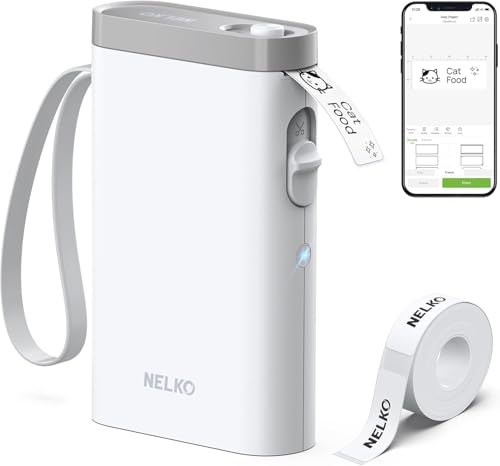
Nelko P21 Review Summary
The Nelko P21 Bluetooth Label Maker is a smart buy for anyone who wants simple, portable, and low-maintenance label printing. It fits best in homes, classrooms, dorm rooms, and small offices where everyday labeling matters more than color output or industrial-grade speed.
What makes the Nelko P21 stand out is the combination of inkless thermal printing, a built-in rechargeable battery, and an app packed with templates, icons, borders, and design tools.
That means you can create pantry labels, file tags, cable labels, QR labels, name tags, or storage stickers in minutes from a smartphone.
For buyers who value convenience and portability, that is a major advantage.
At the same time, this is not the right choice for everyone.
The P21 prints in black only, relies heavily on the app experience, and has a known Android 14 compatibility limitation that buyers should verify before ordering.
In other words, it is a practical everyday organizer rather than a premium all-purpose label system.
Scorecard
| Category | Score | What it means |
|---|---|---|
| Label print quality | 8/10 | 203 DPI thermal printing is clear for text, symbols, QR codes, and barcodes. |
| Portability | 9/10 | Small, lightweight, and easy to carry between rooms, classrooms, or workspaces. |
| App design and templates | 8/10 | Strong template library and creative tools make label creation fast and flexible. |
| Connectivity and setup | 7/10 | Bluetooth app pairing is convenient, but phone compatibility matters. |
| Battery and convenience | 8/10 | Rechargeable wireless operation is excellent for repeated daily use. |
| Label versatility | 7/10 | Good for many organizing tasks, but output is monochrome and size options are fixed. |
Overall verdict: the Nelko P21 is a strong budget-friendly organization tool for phone-first users who want fast results and minimal maintenance.
It is less compelling if you need color labels, wide-format printing, or a more traditional desktop workflow.
Key Features and Specifications of Nelko P21
The Nelko P21 is a Bluetooth thermal label printer designed around speed, simplicity, and portability.
Instead of handling ink cartridges or toner, it uses direct thermal printing, which keeps maintenance low and makes the device appealing for frequent home or office labeling.
| Specification | Details |
|---|---|
| Brand / Model | Nelko P21 |
| Printing technology | Direct thermal |
| Connectivity | Bluetooth |
| Control method | App-based |
| Print output | Monochrome, black text |
| Resolution | 203 x 203 DPI |
| Power | Built-in rechargeable battery |
| Item weight | 0.72 lb |
| Dimensions | 6.65 x 4.5 x 1.9 in |
| Maximum media size | 14 x 75 mm |
| Print function | Print only |
| Compatible devices | iPhone, iOS, Android smartphones |
Several design choices are clearly aimed at convenience.
The mini, portable body is easy to store in a drawer or carry in a bag, and the rechargeable battery makes it much more practical than older plug-in labelers.
The 203 DPI print resolution is also a sensible match for everyday labels: crisp enough for text and codes, but not positioned as a high-end graphic printer.
Feature-wise, the app is a major part of the product.
Nelko says the app includes 3,600+ icons, 700+ borders, 5,500+ materials, and 750+ templates, along with support for 29 languages.
You can also print text, QR codes, barcodes, images, time stamps, materials, and borders, which gives it more flexibility than basic one-button label makers.
Label compatibility is another key buying factor.
The P21 supports multiple label styles and fixed lengths such as 14×40 mm, 14×50 mm, and 14×75 mm.
That is useful for common organizing jobs, but it also means the device is not trying to be fully open-ended.
Pros and Cons of Nelko P21
Here is the short version of the Nelko P21 Bluetooth Label Maker pros and cons before getting deeper into usage and compatibility.
| Pros | Cons |
|---|---|
| Very portable and lightweight | Prints in monochrome only |
| Wireless Bluetooth printing from a phone | Depends heavily on the app for setup and design |
| Inkless thermal printing lowers maintenance | Android 14 compatibility limitation should be checked first |
| Good app template variety | Best results appear to rely on branded label tape |
| Useful for many organizing tasks | Fixed label sizes limit customization |
| Clear enough for everyday labels, QR codes, and barcodes | No color printing or desktop-style flexibility |
Best strengths: portability, low running hassle, and app creativity.
Biggest drawback: the black-only output and compatibility caveat on certain Android phones.
Who Should Buy Nelko P21?
The Nelko P21 is a good fit for buyers who want a small Bluetooth label maker for everyday organization.
It suits people who are comfortable designing and printing from a smartphone rather than using a dedicated physical keyboard.
- Parents and home organizers who want tidy pantry, clothing, toy, or storage labels.
- Teachers and students who need notebook tags, classroom labels, or name stickers.
- Office users who label folders, cables, reminder notes, and internal supplies.
- Small business or side-hustle sellers who need simple barcode or item labels.
- Travel-friendly users who want a compact printer that can move between locations easily.
You should probably skip it if you want color labels, larger formatting flexibility, or a printer that works without an app.
It is also not ideal for buyers who use an Android 14 phone unless compatibility has been confirmed.
How the Nelko App and Templates Work
The app is central to the whole experience, and that is both a strength and a limitation.
On the positive side, the app gives you a lot of creative control for a compact printer.
You are not stuck with plain text labels; you can add icons, borders, QR codes, barcodes, images, and different materials to make labels more useful and easier to scan.
For real-world use, the template library matters more than the marketing numbers.
A parent might use a quick template for school supplies, while an office user may want clean folder labels or asset tags.
The P21 handles those tasks well because the app offers enough variation to keep setup fast.
This is where the Nelko P21 feels modern: you can create labels quickly from a phone without learning a complicated desktop program.
That said, buyers who dislike app-driven hardware may find the workflow less natural than with a traditional keyboard label maker.
If you want a more old-school option with tactile controls, compare it with a Brother P-touch Bluetooth label maker.
If you want a similar phone-first experience, the Phomemo Bluetooth label printer line is worth considering too.
Brother P-touch Bluetooth label maker and Phomemo Bluetooth label printer are the most sensible alternatives to check.
Print Quality and Label Durability
The Nelko P21 uses 203 DPI direct thermal printing, which is a strong match for standard organizational labels.
Text comes out clean enough for shelves, files, containers, and price-style tags, and it is also suitable for QR codes and barcodes where consistency matters more than aesthetics.
Because it is thermal printing, you get no ink or toner to replace.
That lowers the long-term hassle significantly.
For many buyers, that alone is the main reason to choose a device like this over a more complex printer.
That said, thermal printing has a natural ceiling.
You are not buying the P21 for rich graphics, photo-like output, or colorful branding.
The labels are practical rather than decorative.
If your projects need visual distinction, a color-capable label system or separate office printer may be a better fit.
The brand also recommends using NELKO thermal label paper for best results, which is a common and reasonable expectation in this category.
Generic media may work, but consistency usually improves when the printer and labels are designed to work together.
Buyer takeaway: for everyday labels, the print quality is dependable; for design-heavy projects, it is intentionally limited.
Bluetooth Setup and Device Compatibility
Setup is one of the most important decision factors in a phone-controlled label maker.
The Nelko P21 connects through Bluetooth and is operated through the Nelko app, which should make the process straightforward for most users.
In practice, Bluetooth label makers are only as convenient as their software.
The P21 benefits from app control because it keeps the hardware compact, but it also means your first good or bad impression will often come from the app experience.
One caution stands out: the product notes an Android 14 compatibility limitation.
That does not automatically make the printer a poor choice, but it does mean Android buyers should verify their device version before ordering. iOS users also need to update the Nelko app to the latest version for the best experience.
For buyers who own compatible phones, the wireless workflow is a major plus.
You can create a label, print it, and move on without dealing with cables.
That makes the device especially useful for batch organization sessions where speed matters.
Practical advice: if you want a simple mobile label printer, the P21 is a good concept.
If compatibility uncertainty bothers you, buy only after checking your exact phone model and OS version.
What Label Sizes and Formats You Can Print
The Nelko P21 supports a useful but controlled set of label sizes.
The maximum media size is listed as 14 x 75 mm, and fixed lengths include 14×40 mm, 14×50 mm, and 14×75 mm.
That range is enough for most household, classroom, and office labeling tasks.
In practice, these size choices are ideal for:
- Drawer labels
- Kitchen and pantry container tags
- Notebook and binder labels
- Cable identifiers
- Cosmetic and toiletry labels
- Mailing or shipping-style tags for small items
- Name tags and reminder labels
The limitation is customization.
If you want unusually wide labels, long-format signage, or highly bespoke dimensions, this printer is not built for that.
Its value comes from being quick and consistent, not from infinite format freedom.
It is also worth remembering that this is a print-only device.
That is fine for label making, but if you wanted scanning, saving, or multi-function office hardware, you need something else.
Best Uses for Home, School, and Office Organization
The Nelko P21 shines when the job is small, frequent, and practical.
In a home setting, it is especially useful for pantry bins, freezer items, cosmetic drawers, medicine storage, and kids’ belongings.
In school settings, it is excellent for teacher supplies, classroom bins, and student notebooks.
For office use, the printer is helpful for folders, supply drawers, cable tags, and internal organization.
Since it prints barcodes and QR codes, it can also support simple item-tracking workflows for small teams or personal inventory systems.
This is not a heavy-duty industrial label machine. But for the most common everyday labeling jobs, it hits a very good balance between speed and convenience.
- Home: pantry, storage, clothes, cosmetics, mail sorting
- School: books, classroom bins, name labels, reminders
- Office: folders, cables, supplies, asset labels
If your main goal is to restore order quickly, the P21 makes a lot of sense.
If your workflow involves high-volume shipping or commercial branding, you may need a larger and more specialized printer.
Nelko P21 Bluetooth Label Maker Pros and Cons in Real-World Use
Looking at the Nelko P21 Bluetooth Label Maker pros and cons from a buyer’s perspective, the positives are clearly tied to convenience.
It is lightweight, easy to store, and fast to bring into use when a labeling project pops up.
The drawbacks are also straightforward.
The black-only output limits visual coding, and the app dependence means your phone matters as much as the printer itself.
For many buyers, that tradeoff is still worth it because the device remains simple, cheap to run, and easy to live with.
My practical verdict: the P21 is best for people who want a no-fuss label maker they will actually use often.
That is usually a better purchase than a more complex machine that sits unused because it is inconvenient.
Is Nelko P21 Worth It?
Yes, the Nelko P21 Bluetooth Label Maker is worth it for the right buyer. It is especially worthwhile if you want a lightweight, inkless, app-controlled label maker for home, school, or office organization and you do not need color printing.
The biggest reasons to buy are simple: portable design, low maintenance, solid everyday print quality, and a useful template system.
The biggest reasons to skip are equally clear: monochrome output, a heavy dependence on the app, and the Android 14 compatibility note.
If you are comparing options, the Nelko P21 Bluetooth Label Maker is best thought of as a compact everyday organizer rather than a pro-grade labeling station.
Against alternatives like Brother P-touch Bluetooth label maker, Phomemo Bluetooth label printer, or a DYMO rechargeable label maker, the Nelko P21 wins on portability and simplicity, while the bigger brands may appeal more if you want a more established ecosystem.
Final advice: buy the Nelko P21 if you want a compact, phone-based label printer for quick organization and can live with black-only labels.
Skip it if your phone compatibility is uncertain or if you need more advanced output flexibility.