The Ingnok 15.
6-inch Portable Monitor is built for people who want a second screen without carrying a bulky display.
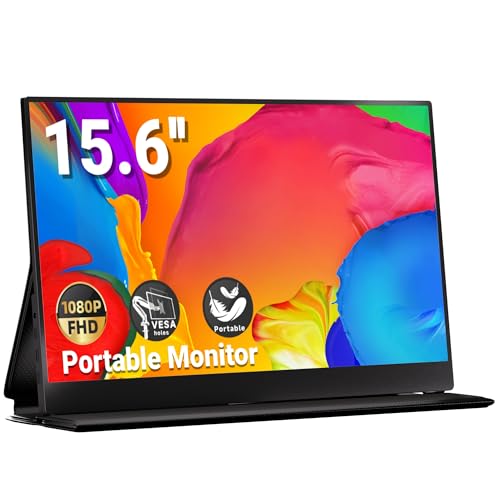
Ingnok Portable Monitor Review Summary
If you need a lightweight external display for travel, school, remote work, or console use, the Ingnok 15.6-inch Portable Monitor makes a lot of sense. It is especially appealing for laptop owners who want a quick dual-screen setup, because the USB-C plug-and-play design keeps friction low and the 15.6-inch Full HD panel gives you enough space for multitasking, streaming, or document work.
What stands out most is the balance between portability and practicality.
The Ingnok 15.6-inch Portable Monitor is not trying to be a premium desktop replacement; instead, it aims to be an easy carry companion that improves productivity wherever you work.
That focus is exactly why many buyers will find it more useful than a tablet used as a makeshift second screen.
Scorecard
| Category | Score | Why it matters |
|---|---|---|
| Display clarity | 8.0/10 | 15.6-inch FHD 1080p panel with a 1200:1 contrast ratio for crisp text and decent image separation. |
| Portability | 9.0/10 | Thin and easy to pack for work, school, or travel. |
| Connectivity and setup | 8.0/10 | Dual full-feature USB-C ports and simple plug-and-play convenience. |
| Compatibility | 8.0/10 | Works well with many Windows and Mac laptops, mini PCs, and consoles. |
| Work productivity | 8.0/10 | Helpful for multitasking, note-taking, and side-by-side document work. |
| Visual comfort | 7.0/10 | Matte finish and wide viewing angles help, though it is still a basic portable LCD. |
| Build and travel practicality | 7.0/10 | Travel-friendly, but not ultralight and not meant to replace a full desktop monitor. |
Bottom line: this is a strong buy for users who value convenience, portability, and second-screen productivity more than premium display extras.
Key Features and Specifications of Ingnok Portable Monitor
The Ingnok Portable Monitor focuses on the features that matter most for everyday external display use.
It is a 15.6-inch portable monitor with a 1920 x 1080 native resolution, a 16:9 aspect ratio, and LCD display technology.
For most buyers, that means the screen is sharp enough for documents, web browsing, spreadsheets, streaming, and casual gaming.
| Specification | Details |
|---|---|
| Brand | Ingnok |
| Screen size | 15.6 inches |
| Resolution | 1920 x 1080 pixels |
| Native resolution | 1920×1080 |
| Display type | LCD |
| Aspect ratio | 16:9 |
| Screen finish | Matte |
| Contrast ratio | 1200:1 |
| Refresh rate | 60 Hz |
| Brightness | 300 nits |
| Viewing angle | 178 degrees |
| Color gamut | 90% |
| Ports | 2 full-feature USB-C 3.1 ports |
| Connectivity | USB plug-and-play |
| Dimensions | 15″ D x 8.7″ W x 0.48″ H |
| Weight | 1.47 kilograms |
A few of those specs matter more than others in real use.
The 300 nits brightness and 90% color gamut are perfectly respectable for a portable monitor, especially if you plan to use it indoors, in hotel rooms, classrooms, offices, or coffee shops.
The 1200:1 contrast ratio should also help the image look more separated than the washed-out panels you sometimes see in cheaper portable displays.
The dual full-feature USB-C 3.1 ports are a major selling point.
When your laptop or compatible device supports USB-C video output, setup can be refreshingly simple.
For buyers who move between workstations often, that convenience is worth a lot.
Pros and Cons of Ingnok Portable Monitor
Here is the practical Ingnok 15.6-inch Portable Monitor pros and cons breakdown from a buyer’s perspective.
| Pros | Cons |
|---|---|
| Very portable and easy to pack for travel | Not a high-end gaming display with fast refresh features |
| Sharp enough for everyday productivity and streaming | Brightness is only adequate for very bright outdoor use |
| Simple USB-C plug-and-play connection | Best experience depends on compatible USB-C video support |
| Useful as a second screen for multitasking | Less immersive than a larger desktop monitor |
| Broad compatibility with laptops and consoles | Some setups may need the right cables or power arrangement |
| Matte finish helps with glare control | Portable-monitor LCD quality will not match premium desktop panels |
The biggest advantage is convenience. The biggest drawback is also clear: if you want ultra-bright HDR-style visuals, high refresh gaming, or office-class premium color tuning, this is not that kind of monitor.
How the 15.6-Inch Screen Feels for Work and Travel
The 15.6-inch size hits a sweet spot for a portable monitor.
It is large enough to be genuinely useful for a second screen, but still compact enough to fit into a backpack without turning your bag into a desktop replacement.
The 16:9 layout is especially practical for side-by-side windows, Zoom calls, spreadsheets, and document comparison.
For travel, the Ingnok 15.6-inch Portable Monitor’s 15″ D x 8.7″ W x 0.48″ H footprint and 1.47-kilogram weight place it firmly in the “portable accessory” category rather than the “ultralight gadget” category.
That is fine, as long as you know what you are buying.
It is easy to carry, but it is still a real monitor, not a paper-thin tablet stand-in.
If you often work from temporary setups, this design choice makes sense.
You get a larger workspace without committing to a heavy external display.
That is why this model is attractive to students, remote employees, and business travelers who need a dependable second screen without a complicated desk setup.
USB-C Setup and Device Compatibility
The USB-C setup is one of the strongest reasons to consider the Ingnok Portable Monitor.
Dual full-feature USB-C 3.1 ports make the monitor easier to integrate with modern laptops and compact computers, and the plug-and-play approach should reduce setup friction for most buyers.
Compatibility is a major decision factor here.
The monitor is designed for broad use with Windows laptops, Mac laptops, mini PCs, and consoles, including Switch and PS5.
That makes it a flexible pick if you want one screen that can move between work and entertainment.
That said, buyers should still check whether their device supports video over USB-C.
Not every USB-C port carries display output, and some consoles or mini PCs may need the right cable or power arrangement.
If you want the easiest experience, use a laptop known to support USB-C display-out.
If you are shopping for a mixed-device setup, verify compatibility before assuming one cable will do everything.
This is a buyer-fit product, not a universal miracle device. If your gear is modern and USB-C friendly, the setup experience should be simple.
If your hardware is older or more fragmented, you may need a little extra planning.
Gaming and Console Use With a Portable Monitor
For casual gaming, the Ingnok 15.6-inch Portable Monitor should be perfectly serviceable.
The 60 Hz refresh rate keeps it in the standard portable monitor range, which is fine for Switch play, console single-player titles, and general entertainment.
It is not designed to chase fast competitive gaming specs, so buyers expecting high refresh performance should look elsewhere.
The portable form factor actually makes a lot of sense for console use.
It can become a compact screen for dorm rooms, guest spaces, travel, or temporary gaming stations.
If you play on a Switch, the monitor’s 1080p format and 16:9 aspect ratio fit the device well.
For PS5 use, it works best as a flexible secondary display rather than a performance-first gaming monitor.
Where it shines is convenience gaming. If your priority is having a compact screen you can move around easily, this monitor is a practical choice.
If your priority is motion handling, premium brightness, or advanced gaming features, a gaming-focused monitor from ASUS, ViewSonic, or a higher-end portable line may suit you better.
Matte Display, Viewing Angles, and Outdoor Glare
The matte finish is one of the most useful design choices on the Ingnok 15.6-inch Portable Monitor.
Glossy portable panels can look nice indoors, but they often become annoying in bright rooms or under office lighting.
A matte surface helps soften reflections and makes the screen easier to live with during long work sessions.
The 178-degree viewing angle is another practical touch.
That wide angle helps when you are sharing the screen with someone beside you, or when the monitor is tilted on a stand and you are not sitting perfectly centered.
It does not make the display premium, but it does make the panel easier to use in normal real-world conditions.
Outdoor use is where expectations should stay realistic.
The 300 nits brightness is solid for indoor and moderate-light environments, but it is not ideal for very bright outdoor viewing.
In direct sun or harsh glare, even a matte portable monitor will struggle.
If you plan to work outside regularly, you may want a brighter panel or a shaded setup.
Still, for typical desk, hotel, classroom, and travel use, the matte finish adds real value and helps the monitor feel more usable than some budget alternatives.
Who Should Choose a Portable Monitor Over a Tablet
If you are deciding between a portable monitor and a tablet, the Ingnok 15.6-inch Portable Monitor makes a strong case for the monitor side.
A tablet can be more self-contained, but a portable monitor gives you a more natural second-screen workflow for a laptop, especially if you work with browser tabs, documents, spreadsheets, or editing tools.
Choose a portable monitor if your main goal is productivity. It is better suited to actual desktop-style multitasking, and it integrates more naturally into a laptop setup.
A tablet may be better if you want touch input, stand-alone apps, or casual media consumption without cables.
This model is also a smart choice if you are trying to make a small workspace feel larger.
A laptop plus portable monitor arrangement can be a much better investment than upgrading to a bigger laptop, especially if you already like your current machine and only need more screen real estate.
Best Alternatives to Consider
If the Ingnok 15.6-inch Portable Monitor is close to what you want but not exactly right, a few alternatives are worth considering.
The best choice depends on whether you want touch control, more screen space, or a more established brand name.
- ARZOPA 15.6-inch portable monitor — a common alternative for buyers who want a similar travel-friendly external screen.
- ASUS portable monitor — worth a look if you prefer a brand with a strong monitor reputation and broader model variety.
- ViewSonic portable monitor — a good option if you want a more established display brand.
- 15.6-inch portable monitor touchscreen — consider this if touch input matters for creative or presentation use.
- 18.5-inch portable monitor — a better fit if you want a larger workspace and are willing to give up some portability.
My advice: stick with the Ingnok if portability, USB-C simplicity, and straightforward productivity matter most.
Look at the alternatives if you want touch support, a larger panel, or a more premium brand ecosystem.
Who Should Buy Ingnok Portable Monitor?
The Ingnok Portable Monitor is a good match for students, remote workers, frequent travelers, and laptop users who need a practical second screen.
It also makes sense for console players who want a compact, easy-to-move display for Switch or PS5 use.
- Buy it if you want a travel-friendly monitor that can slip into a backpack and support work anywhere.
- Buy it if you use a laptop as your main machine and want a faster workflow with side-by-side windows.
- Buy it if you value simple USB-C setup and do not want to deal with a bulky dock-and-monitor arrangement.
- Buy it if you need a flexible screen for office, study, entertainment, and casual gaming.
Who should skip it?
Buyers who want a premium color-accurate panel, gamers chasing high refresh rates, or anyone planning to use a monitor primarily in bright outdoor environments.
Also skip it if you need a desktop replacement with maximum screen size.
In short, this is a practical portable monitor for real-world use, not a spec-chasing showpiece.
Is Ingnok Portable Monitor Worth It?
Yes, the Ingnok 15.6-inch Portable Monitor is worth it for the right buyer. It delivers the features that matter most in a portable second screen: a 15.6-inch FHD panel, USB-C convenience, matte anti-glare styling, and broad compatibility with common laptops and consoles.
The value proposition is strongest if your goal is to improve productivity or make travel work easier.
It is not trying to win a spec sheet battle against premium gaming monitors or high-end desktop displays.
Instead, it wins by being easy to carry, simple to use, and useful in more places than a traditional monitor.
Buy it if you want portability first, with enough display quality for everyday work and entertainment. Skip it if you want a brighter, faster, or more premium panel for specialized use.
For most people shopping for a compact second screen, though, the Ingnok 15.6-inch Portable Monitor is a sensible and well-targeted choice.