The KYY Triple Laptop Screen Extender X90E review boils down to one question: do you want a true portable multi-monitor workspace without carrying separate screens?
For the right Windows user, it is a clever, productivity-first solution.
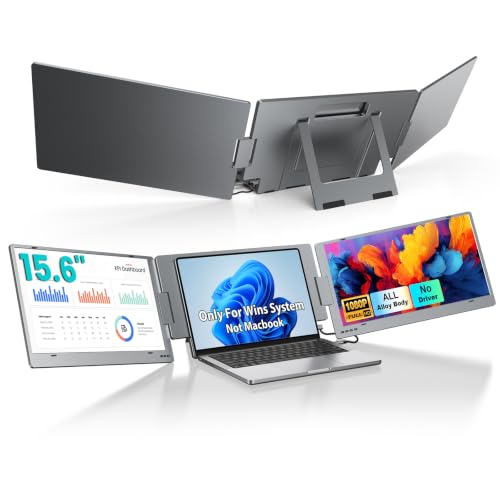
KYY X90E Review Summary
The KYY Triple Laptop Screen Extender X90E is built for people who need more screen real estate while traveling, working remotely, or moving between home and office.
If your workflow depends on keeping email, spreadsheets, meetings, and reference documents visible at the same time, this is one of the most practical ways to transform a laptop into a triple-screen workstation.
What makes it appealing is not just the extra displays, but the fact that the KYY Triple Laptop Screen Extender X90E is designed around speed and convenience.
You get a plug-and-play setup, multiple display modes, and independent screen control, which means you can tailor it to a serious work session or a lighter dual-screen setup when you do not need all three panels active.
Best for: Windows laptop users who want portable multitasking power, frequent travelers, students, remote professionals, and anyone who wants a compact desktop-style workflow without carrying a docking station and separate monitors.
Not ideal for: Mac users, buyers whose laptops lack the required USB-C video output support, and anyone who needs the lightest possible travel accessory.
Scorecard
| Category | Score | Why It Matters |
|---|---|---|
| Screen Expansion | 10/10 | Adds two extra portable displays for a triple-screen workstation, with the option to run as dual-screen or single external screen when needed. |
| Compatibility | 7/10 | Designed for Windows laptops in the 12-17 inch range, but it depends on a USB-C port with Thunderbolt 3/4 or DP Alt Mode support. |
| Image Quality | 8/10 | The 15.6-inch IPS panels use 1080p resolution, 300-nit brightness, 1200:1 contrast, and wide color support for clear everyday productivity viewing. |
| Portability | 7/10 | Built for travel use with a foldable extender design and a built-in kickstand, though the system is still relatively heavy for a portable accessory. |
| Setup Simplicity | 9/10 | Single-cable plug-and-play use is a major strength, with no driver installation required and multiple screen modes available. |
| Adjustability | 8/10 | Each screen can rotate up to 210 degrees, and the kickstand offers angle adjustment for flexible sharing and viewing. |
| Comfort for Long Sessions | 8/10 | Blue light protection and customizable RGB, brightness, and contrast controls make it better suited to extended work sessions. |
If you want a portable monitor solution that feels more like a mobile command center than a simple screen accessory, the KYY Triple Laptop Screen Extender X90E is an excellent candidate.
The main tradeoff is obvious: you gain a lot of productivity, but you must accept Windows-only support and a larger, heavier form factor than a single portable display.
Key Features and Specifications of KYY X90E
The KYY Triple Laptop Screen Extender X90E packs a lot into one accessory, and the feature set is clearly focused on business travel and multitasking.
| Specification | Details |
|---|---|
| Brand / Model | KYY / X90E |
| Product Type | Triple laptop screen extender |
| Compatibility | Windows only |
| Laptop size support | 12-17 inch laptops |
| Connection | USB-C |
| Setup | Plug and play, no drivers required |
| Panel size | 15.6 inches |
| Panel type | IPS LCD |
| Resolution | 1080p FHD |
| Aspect ratio | 16:9 |
| Brightness | 300 cd/m² |
| Contrast ratio | 1200:1 |
| Color support | 16.7 million colors, 85% NTSC |
| Refresh rate | 60 Hz |
| Response time | 1 ms |
| Viewing angle | Up to 210 degrees |
| Power | 5 V |
| Ports | 2 total USB ports, 1 Thunderbolt port |
| Dimensions | 1.18" D x 15.2" W x 10.9" H |
| Weight | 3.43 kg |
Some of the standout design choices here are important for buyers to understand.
The single USB-C cable connection is the headline convenience feature, but the laptop must still support video output through Thunderbolt 3/4 or USB 3.1 DP Alt Mode.
That requirement makes the KYY Triple Laptop Screen Extender X90E much more selective than a basic portable monitor.
Other useful features include independent screen control, multiple display modes such as extended, mirror, portrait, and single second-screen use, plus blue light protection for longer sessions.
The built-in kickstand and rubber mat help stabilize the unit on a desk, while the rotation range gives users flexibility when sharing a screen or adjusting for better sightlines.
Pros and Cons of KYY X90E
Here is the practical KYY Triple Laptop Screen Extender X90E pros and cons breakdown from a buyer’s perspective.
| Pros | Cons |
|---|---|
| Expands a laptop into a triple-screen setup for serious multitasking | Windows-only compatibility limits the audience |
| Simple one-cable setup with no drivers | Requires specific USB-C/Thunderbolt/DP Alt Mode support on the laptop |
| Independent screen control and flexible multi-mode usage | Heavier than many portable monitor accessories |
| Good IPS image quality for productivity work | Glossy screen finish may reflect light in bright environments |
| Strong adjustability with rotation and kickstand support | Not a standalone monitor system; it depends on the host laptop |
| Blue light protection may help with long sessions | Some laptops may need careful compatibility checking before purchase |
The strengths are easy to understand: this product is about turning one laptop into a mobile multi-monitor station.
The weaknesses are equally clear: compatibility matters, and the hardware is not as featherweight as a single-screen portable monitor.
Who Should Buy KYY X90E?
The KYY Triple Laptop Screen Extender X90E is best for users who value workflow efficiency more than minimalist portability.
If you spend your day switching between communication apps, project trackers, browser tabs, and documents, the extra screens can reduce friction immediately.
- Remote workers who want a portable office setup.
- Business travelers who need a high-output workstation in hotels, co-working spaces, or client sites.
- Students who research, write, and attend online classes at the same time.
- Spreadsheet and data-heavy users who benefit from keeping multiple sources visible.
- Presenters and collaborators who want easier screen sharing and mirror mode.
Who should skip it?
Mac users, anyone whose laptop USB-C port cannot provide display output, and buyers who only want a lightweight secondary screen.
If you do not need triple-screen expansion, a simpler portable monitor may be the smarter buy.
How Triple-Screen Mode Works
The core appeal of the KYY Triple Laptop Screen Extender X90E is obvious the moment you set it up: one laptop becomes a three-screen productivity platform.
That is a meaningful upgrade for anyone who uses their laptop like a desktop replacement.
The system supports a 1-screen-to-3-screens workflow, but it is also more flexible than that.
You can run it in dual-screen mode when you do not need the full spread, or use a single external display mode for lighter work.
That flexibility matters because it keeps the product useful across different situations instead of forcing you into one fixed layout.
Independent screen behavior is another thoughtful design choice.
Each screen can be turned off, awakened, or adjusted separately, which can save power and reduce visual clutter.
For people who frequently move between concentrated solo work and collaborative sessions, that is a legitimate usability advantage.
For the best experience, think of the KYY Triple Laptop Screen Extender X90E as a portable productivity tool rather than an entertainment accessory.
It shines with office apps, research, communication, coding support, and side-by-side reference work.
Windows Compatibility and USB-C Requirements
This is where the buying decision gets more serious.
The KYY Triple Laptop Screen Extender X90E is Windows only, and that alone will eliminate a large portion of potential buyers.
More importantly, the laptop must have a USB-C port with Thunderbolt 3/4 or DP Alt Mode support.
In plain terms, that means not every USB-C port will work the same way.
A USB-C port that handles charging or data alone is not enough if it cannot send video signals.
That makes pre-purchase verification essential.
If your laptop is compatible, setup should be straightforward and fast.
If it is not, no amount of convenience elsewhere will make the product usable.
Buying advice: check the laptop model, port specifications, and operating system before ordering.
This is one of those accessories where a five-minute compatibility check can prevent a very disappointing return.
Travel-Friendly Design and Desk Setup
On paper, the KYY Triple Laptop Screen Extender X90E is designed for travel.
In practice, it is best described as portable in function, not ultra-light in form.
The foldable structure and built-in kickstand make it easier to deploy on a hotel desk, kitchen table, or temporary work surface.
The rubber mat also helps reduce slipping, which is a helpful detail when you are balancing multiple panels around a laptop base.
That said, the system weighs 3.43 kg, so buyers should be realistic.
This is not the kind of accessory you casually toss into a small commuter bag and forget about.
It is more suitable for users who want the benefits of mobility without expecting tablet-like portability.
For desk setup, the form factor makes sense: the additional screens create a wider workspace and the integrated support keeps the unit self-contained.
If you already travel with a laptop sleeve, charger, and mouse, this may still fit into your routine.
If you pack extremely light, a single portable monitor could be a better compromise.
Display Quality for Productivity and Sharing
The display hardware is tailored for work rather than premium creative color grading.
The KYY Triple Laptop Screen Extender X90E uses 15.6-inch IPS panels with 1080p FHD resolution, 300-nit brightness, 1200:1 contrast, and support for 16.7 million colors.
For productivity, that is a solid combination.
Text looks crisp enough for office work, browser use, and document editing, and the IPS viewing angles make the three-panel layout easier to use from slightly different positions.
The 85% NTSC color gamut is respectable for day-to-day use, though it is not the same thing as a color-critical creative monitor.
The glossy finish is the biggest display compromise.
Glossy panels often look punchier indoors, but they can also pick up reflections under bright office lighting or near windows.
If your workspace has harsh overhead light, that is worth considering.
In short, the panel quality is well matched to the product’s mission: clear, practical, productivity-focused viewing with enough image quality to make the extra screen space genuinely useful.
Rotation, Kickstand, and Viewing Angles
Ergonomics matter a lot on a multi-screen extender, and KYY made a few smart choices here.
Each screen supports up to 210 degrees of rotation, which helps when positioning the displays for better comfort or sharing content with someone across the desk.
The kickstand supports up to a 90-degree adjustable angle, giving the setup a more flexible footprint than many fixed monitor accessories.
That flexibility can improve typing posture and screen alignment, especially when you use the extender for long work sessions.
From a usability standpoint, these adjustments are not just nice extras.
They directly affect whether the product feels natural during real-world use.
A good triple-screen extender needs to adapt to the user, not force the user into one awkward position.
The blue light protection is another small but worthwhile quality-of-life feature.
It will not replace good screen habits, but it can make extended work periods feel less fatiguing.
Comparable Alternatives to Consider
If the KYY Triple Laptop Screen Extender X90E is close to what you want, it is still smart to compare it with a few broader alternatives before buying.
- KYY Triple Laptop Screen Extender X90E if you want this exact triple-screen style and already know your laptop is compatible.
- portable dual screen laptop extender Windows if you want a similar idea but do not need three panels.
- single portable 15.6 inch USB-C monitor if simplicity, weight, and lower desk footprint matter more than maximum screen expansion.
- portable monitor matte finish if you work in bright spaces and want to reduce reflections.
- Mac compatible portable monitor extender if you need broader OS support.
Compared with those options, the KYY Triple Laptop Screen Extender X90E stands out for maximum screen expansion.
The main reason to choose something else is not performance, but compatibility or portability priorities.
Is KYY X90E Worth It?
So, is KYY Triple Laptop Screen Extender X90E worth it?
If you own a compatible Windows laptop and you genuinely need more workspace on the go, the answer is yes.
It offers a rare mix of triple-screen expansion, easy setup, adjustable viewing, and usable image quality in one portable package.
The value proposition is strongest for people whose productivity improves when they can keep multiple apps visible at once.
Remote workers, multitaskers, and travelers will get the most benefit because the product directly removes the friction of switching windows and tabs all day.
However, this is not an impulse buy.
The compatibility requirements are real, the weight is noticeable, and the glossy displays are not ideal for every environment.
Those are not deal-breakers for the right user, but they are important to acknowledge before checkout.
Final verdict: the KYY Triple Laptop Screen Extender X90E is a smart buy for compatible Windows users who want serious portable productivity.
If you need triple-screen efficiency and can live with the size, it is one of the more compelling laptop extender concepts available.