The Rongta RP425 Bluetooth Shipping Label Printer review starts with one simple question: does this compact thermal label printer make shipping easier?
For many small sellers, the answer is yes.
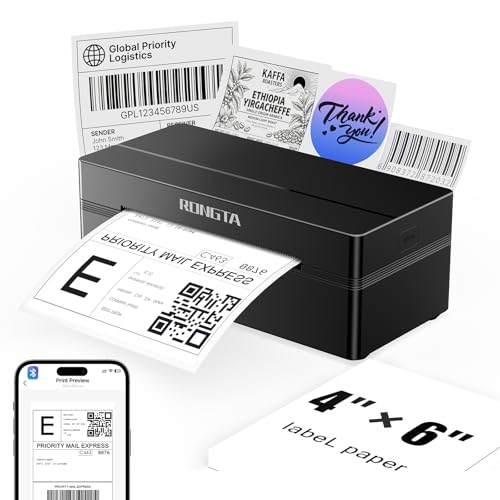
Rongta RP425 Printer Review Summary
The Rongta RP425 Bluetooth Shipping Label Printer is a smart buy for ecommerce sellers who want a fast, portable, and low-fuss way to print shipping labels, barcodes, QR codes, and other direct-thermal labels.
It is especially appealing if you print from phones or tablets and want a compact printer that does not take over your desk.
If your workflow revolves around Amazon, Shopify, Etsy, or a similar marketplace, this model is built around that use case.
The combination of Bluetooth and USB connectivity, 203 dpi output, and up to 150 mm/s print speed makes it a strong fit for routine label runs where speed and simplicity matter more than color or document printing.
Scorecard
| Category | Score | Why it matters |
|---|---|---|
| Printing speed | 9.0/10 | Fast thermal output suits busy shipping and warehouse label runs. |
| Mobile compatibility | 9.0/10 | Bluetooth support through the RLabel app makes phone and tablet printing straightforward. |
| Desktop compatibility | 8.0/10 | Windows, Mac, and Chrome OS support broadens usability across devices. |
| Label handling | 8.0/10 | Automatic label identification and a wide width range reduce setup friction. |
| Versatility | 8.0/10 | Handles shipping labels plus smaller barcode, QR code, and circular labels. |
| Portability | 8.0/10 | The compact, lightweight build is easy to store, move, or use in tight workspaces. |
Bottom line: if you need a dedicated direct-thermal label printer for shipping and product labeling, the Rongta RP425 is an efficient, buyer-friendly option with strong everyday value.
It is not a general office printer, but for label workflows it checks the right boxes.
Key Features and Specifications of Rongta RP425 Printer
Here is the practical spec breakdown buyers should look at before deciding whether this printer fits their setup.
| Specification | Details |
|---|---|
| Brand | Rongta |
| Model | RP425 / Thermal Label Printer Bluetooth |
| Printing technology | Direct thermal |
| Connectivity | Bluetooth, USB |
| Supported devices | iOS, Android, Windows, Mac, Chrome OS |
| Mobile app | RLabel app for iOS and Android |
| Driver support | Windows driver software from Rongta’s official website |
| Print resolution | 203 dpi |
| Maximum print speed | Up to 150 mm/s |
| Print output | Monochrome |
| Color | Black |
| Item weight | 0.65 kg |
| Dimensions | 10.2 x 7.4 x 5.3 inches |
| Supported label width | 0.98 to 4.37 inches |
| Special feature | Portable |
- Automatic label identification and feeding helps simplify setup and reduce misfeeds.
- Direct thermal printing means no ink or toner to replace.
- Compatible with common label formats like 4×6 shipping labels, 2×2 circular labels, 2×1 barcode labels, and 1×1 QR code labels.
- Compact size and light weight make it easy to keep on a desk or move between workstations.
These features make the RP425 much more than a casual label gadget.
It is a purpose-built shipping printer for sellers who value quick setup, broad device compatibility, and low-maintenance operation.
Pros and Cons of Rongta RP425 Printer
Every buyer should weigh the Rongta RP425 Bluetooth Shipping Label Printer pros and cons before making a purchase.
This model delivers real strengths, but it also has clear limitations that matter depending on your workflow.
Pros
- Fast printing for shipping labels and other direct-thermal jobs.
- Bluetooth support makes it convenient for iPhone, iPad, Android phones, and tablets.
- Broad desktop compatibility across Windows, Mac, and Chrome OS.
- Automatic label detection reduces first-use frustration.
- Compact and lightweight design suits small offices, home businesses, and mobile work setups.
- Handles a useful range of label sizes for shipping, inventory, and product identification.
Cons
- Monochrome output only, so it is not for color branding or graphics-heavy labels.
- Not a general document printer; it is built specifically for labels.
- Mobile printing depends on app workflow, which may take a little adjustment if you are used to plug-and-print devices.
- Requires compatible thermal labels, so you must match the media width before buying supplies.
For the right buyer, these cons are acceptable tradeoffs.
In fact, they reflect the fact that the RP425 is focused on doing one job well rather than trying to be everything at once.
Who Should Buy Rongta RP425 Printer?
The Rongta RP425 Bluetooth Shipping Label Printer is a strong match for sellers and small business owners who print labels regularly and want a compact printer with flexible device support.
If you are looking for a shipping label printer that works from a phone, tablet, or desktop, this one deserves serious consideration.
- Ecommerce sellers on Amazon, Shopify, Etsy, and similar platforms.
- Small businesses that need a reliable label printer for packaging and inventory.
- Home-office users who want to save desk space.
- Mobile-first sellers who prefer Bluetooth printing from iOS or Android.
- Warehouse or fulfillment users who need fast, simple direct-thermal output for standard labels.
Who should skip it?
If you need a printer for invoices, color logos, or mixed office work, this is not the right tool.
You would be better served by a conventional inkjet, laser printer, or a higher-end label solution from a more established industrial line.
Bluetooth Setup and App Workflow
Bluetooth is one of the biggest reasons buyers consider a shipping label printer like this.
On the RP425, the setup flow is centered around the RLabel app for iOS and Android, while desktop users can rely on Windows drivers, with support also available for Mac and Chrome OS.
In practical terms, this means the printer is flexible, but not completely invisible to setup.
Mobile users will need to install the app and follow the label workflow there, which is normal for this category.
Desktop users should download the official driver package before expecting smooth operation.
Why this matters: Bluetooth printing is especially useful if you do not want to tether your phone or tablet to a USB cable.
That convenience is valuable for sellers who process orders from multiple devices or move around a workspace during packing.
If you want to jump into setup after unboxing, a dedicated label printer with phone support is often the easiest route.
It is a clear advantage for flexible shipping workflows, but buyers should be comfortable installing software and choosing the correct media settings.
Check the Rongta RP425 on Amazon
Label Size Compatibility and Media Handling
Label handling is one of the most important buying factors in any thermal printer review.
The RP425 supports direct thermal labels from 0.98 inches to 4.37 inches wide, which is a useful span for most small-business label tasks.
That range covers the common label types many sellers use every day:
- 4×6 shipping labels for parcels and marketplace fulfillment.
- 2×2 circular labels for packaging or product branding.
- 2×1 barcode labels for inventory and shelf organization.
- 1×1 QR code labels for compact identification tasks.
The included automatic label identification is a meaningful quality-of-life feature.
It helps reduce the chance of loading the wrong size or wasting labels during setup, which is a real advantage for busy sellers who do not want to babysit the printer.
Buyer tip: verify your preferred label rolls or stacks before ordering.
Because this printer is designed around thermal media, compatibility is excellent when you match the right supplies, but poor if you try to force non-thermal labels into the workflow.
Print Quality for Shipping and Barcode Labels
At 203 dpi, the RP425 is squarely in the standard thermal label printer class.
That resolution is appropriate for shipping labels, scannable barcodes, QR codes, address blocks, and most inventory labels.
For buyers, the key question is not whether the printer looks fancy, but whether it prints clearly enough for real-world shipping.
In that respect, the RP425 is well positioned.
The monochrome output is exactly what most label workflows need: crisp text, strong contrast, and efficient printing without the complexity of color systems.
The up to 150 mm/s print speed also matters.
That speed is fast enough to keep a packing station moving, especially when you are printing batches of orders.
If you ship in volume or frequently print replacements after order changes, this kind of speed saves time in a way that smaller, slower printers do not.
Where it falls short is obvious: if your labels depend on detailed branding, color-coded sections, or decorative graphics, this is not the right category.
But for the most common shipping and barcode tasks, it is a practical and efficient performer.
Best Use Cases for Small Businesses and Marketplaces
The Rongta RP425 is best understood as a dedicated label tool, not a general printer.
That focus is what makes it appealing for small business users who want a straightforward way to move orders out the door.
- Marketplace fulfillment for Amazon, Etsy, Shopify, and similar storefronts.
- Shipping workflows that require quick 4×6 labels.
- Inventory systems that use barcode or QR labels.
- Home businesses with limited space and a need for portable equipment.
- Travel or temporary workstations where compact gear is useful.
If you only print a few labels occasionally, this may be more printer than you need.
But if labels are part of your daily routine, the efficiency gains become noticeable very quickly.
Desk Space, Portability, and Storage
One of the more appealing design choices here is the compact footprint.
The RP425 measures 10.2 x 7.4 x 5.3 inches and weighs just 0.65 kg, which makes it easy to fit on a crowded desk or tuck away when not in use.
That portability is not just a nice extra.
For a home seller, every inch of desk space matters.
For a small warehouse, a lightweight printer can be moved closer to the packing table when needed.
For occasional travel use, compact dimensions make the printer easier to store and transport than bulkier desktop label machines.
Design-wise, this is a sensible product: black housing, simple direct-thermal function, and a form factor that prioritizes utility over flash.
Buyers looking for a sleek but practical shipping accessory will likely appreciate that approach.
Rongta RP425 Printer vs Alternatives
If you are comparing the RP425 to alternatives, think first about your business size and workflow.
That will tell you whether this model is the right fit or whether you should step up or sideways into another label printer family.
- Other Bluetooth 4×6 thermal shipping label printers are the closest comparison if you want similar phone-friendly convenience.
Search Amazon for Bluetooth 4×6 thermal shipping label printer.
- Brother label printers can be a better fit if you already use a broader office labeling ecosystem.
Search Amazon for Brother label printer.
- Zebra label printers are worth considering for more established business workflows and heavier-duty use.
Search Amazon for Zebra label printer.
- Desktop USB thermal label printers are a sensible alternative if your printing happens mostly from one workstation.
Search Amazon for desktop USB thermal label printer.
Compared with those options, the RP425’s biggest advantage is balance: broad compatibility, compact size, and a focus on simple shipping workflows without pushing into more expensive territory or unnecessary complexity.
Is Rongta RP425 Printer Worth It?
Yes, the Rongta RP425 Bluetooth Shipping Label Printer is worth it for the right buyer. If you need a dedicated thermal label printer for shipping, barcode labels, and QR labels, it offers the kind of speed, convenience, and compatibility that small sellers actually use every day.
The strongest reasons to buy are its Bluetooth mobile support, wide device compatibility, automatic label handling, and compact form factor.
Those features make it especially attractive for ecommerce sellers and home businesses that want a straightforward setup and a small footprint.
The main drawbacks are also clear: it is monochrome only, it is not designed for general office printing, and mobile use depends on the app workflow.
If that matches your needs, the tradeoff is easy to accept.
Final verdict: buy the Rongta RP425 if you want a practical, portable, and easy-to-use shipping label printer for everyday label tasks.
Skip it only if you need color printing or a multipurpose office machine.
View the Rongta RP425 Bluetooth Shipping Label Printer on Amazon