A good gaming gift can make a familiar setup more comfortable, immersive, or ready for streaming. These eight ideas span desk accessories, sound, and gear for different play styles.
Before choosing, consider the recipient’s platform, available desk or room space, and whether they would enjoy a focused upgrade or a larger shared experience.
8 Gift Ideas for Gamers, from Desk Upgrades to Immersive Play
SteelSeries Arctis Nova 7P Wireless Gaming Headset

- Wireless play supports PC, PlayStation, Switch, or tablet use with a portable USB-C dongle.
- Dual audio streams let players mix calls or music with game audio.
- The retractable mic can be tucked away for a commute.
Best Gift For: A gamer who switches between PlayStation, PC, Switch, VR, or mobile play.

SteelSeries Apex Pro TKL Gaming Keyboard

- OmniPoint 2.0 switches offer adjustable activation and deactivation.
- Per-key actuation has 40 levels to tailor key presses.
- Two actions can be programmed to the same key.
Best Gift For: A PC gamer who wants to customize key response and keep a compact desk layout.
SteelSeries Rival 5 Gaming Mouse

- The programmable layout has nine buttons, including five quick-action side buttons.
- The optical sensor provides true one-to-one tracking.
- The Rival 5 weighs 85g and has a durable build.
Best Gift For: A gamer who plays Battle Royale, FPS, MOBA, or MMO games.
FIFINE AmpliGame AM8 XLR/USB Gaming Microphone

- USB and XLR connections support connection to a PC or mixer sound card.
- The mic has a tap-to-mute control, gain knob, headphone jack, and volume control.
- RGB lighting can be changed or turned off when connected over USB.
Best Gift For: A gamer or streamer setting up a microphone for gaming, podcasting, or voiceovers.
TP-Link Archer AXE75 WiFi 6E Tri-Band Router

- The 6 GHz band is designed to bring more bandwidth and support responsive gaming and video calls.
- OFDMA and tri-band technology increase capacity for simultaneous device transmission.
- OneMesh can extend whole-home coverage with a compatible TP-Link extender.
Best Gift For: A gamer sharing a home network with others who stream, browse, or play online.
HUANUO FlowLift Dual Gaming Monitor Stand

- The stand is designed for computer screens from 13 to 32 inches.
- Full-motion adjustment includes tilt, swivel, and rotation.
- Built-in cable management guides wires along the arms.
Best Gift For: A gamer with two compatible monitors who wants to free up desk space.
Audioengine A2+ Wireless Computer Speakers

- Bluetooth supports wireless streaming from phones, tablets, and computers.
- USB-C, RCA, and 3.5mm AUX inputs support wired connections.
- Real wood cabinets are hand-finished.
Best Gift For: A gamer who enjoys desktop listening for games, music, podcasts, or movies.
Valerion VisionMaster Pro2 Triple Laser Projector
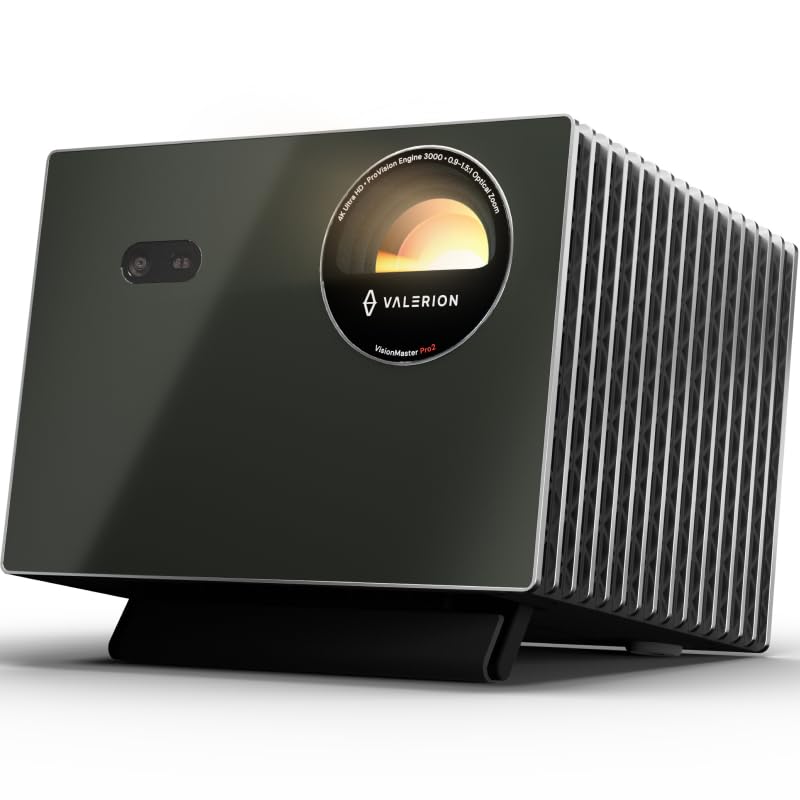
- The projector offers 4K UHD clarity with AI Super Resolution.
- Its OpticFlex lens has a 0.9–1.5 throw ratio and automatic focus and keystone correction.
- Gaming modes include RPG, FPS, and RCG.
Best Gift For: A gamer planning a room setup for large-screen games and movie nights.
1. Match the gift to how they play
When choosing gifts for gamers, start with the way the person actually plays. A PC player may appreciate a keyboard with adjustable key response, while someone who moves between several platforms could use a headset designed for that mix.
Ask casually which games or systems they use most, or check whether they already own a similar accessory.
Think about the setting, too. A solo player with a compact desk may get more use from a mouse or audio upgrade than room-scale equipment.
A household where several people stream and play at once may value a network upgrade, while friends who gather for games and movies might enjoy a shared viewing setup.
Compatibility is a practical part of the gift. Check the recipient’s platform, computer connections, and existing setup before ordering.
For a monitor mount, confirm the display and desk requirements carefully; for audio or streaming gear, check the ports and connection types they can use.
2. Set a budget around the setup
These gifts span smaller desk accessories through major room upgrades, so decide what kind of occasion and spending level make sense first. A focused accessory can be a thoughtful standalone present, while larger purchases may fit a group gift or a milestone.
Keep the gift’s practical role in mind alongside its price.
For a tight budget, consider whether one well-chosen item solves a real annoyance: too few mouse buttons, limited desk space, or a desire for clearer desktop audio. For a shared contribution, coordinate before buying so the recipient does not end up with duplicate gear or an upgrade that conflicts with a setup they already planned.
Check actual prices before deciding, since costs can change. Compare the complete setup the recipient needs, including any compatible cables, mounts, or other required components.
A lower-cost item may still involve extra setup or compatibility checks, while a premium purchase should match a clear use case.
3. Personalize gifts for gamers
Gifts for gamers feel more personal when they reflect a favorite way to play. Think about whether the recipient enjoys competitive matches, streaming, co-op evenings, or playing across several devices.
That detail can help narrow the choices to something they will use regularly rather than a novelty that sits on a shelf.
Presentation can connect the gift to their interests without adding clutter. Pair a desk upgrade with a handwritten note referencing a game night you share, or wrap a streaming accessory with a simple invitation to help set up the space.
For a household gift, explain how it could support everyone’s movie or gaming evenings.
If you are unsure of a technical preference, leave room for the recipient to choose. Include a gift receipt where available, and avoid guessing about platform compatibility or desk dimensions.
A short note that says why you picked the item can make even a practical accessory feel considered.
4. Choose for comfort, space, and routine
A good setup gift should fit the person’s room and habits. Someone who plays at a desk every evening might welcome a cleaner layout or more flexible screen positioning.
A player who shares space with family may prefer compact gear that works for both games and everyday listening.
Consider whether the gift will be easy to integrate. Measure available space and check what the recipient already uses before buying a larger item.
For networking gear, confirm it suits their internet setup and household needs; for a monitor stand, verify screen mounting and desk compatibility directly with current product information.
Think about who else benefits. Speakers or a projector can turn gaming into a shared activity, while a microphone or headset may suit someone who prefers online play and streaming.
Choosing around the recipient’s routine keeps the gift useful beyond a single game or season.
5. Make a timely, low-stress purchase
If time is short, select a gift with a clear fit and straightforward compatibility. Check the latest product details, delivery estimate, return options, and whether the recipient’s setup supports it before placing the order.
Delivery timing can vary, so make the estimate part of the decision rather than assuming it will arrive by a particular date.
For an uncertain match, choose a flexible accessory or give a small note explaining the intended upgrade and let the recipient take part in the final choice. This works well when desk dimensions, ports, or gaming platform are not easy to confirm without spoiling the surprise.
Keep a backup in mind in case a preferred option does not fit the setup or timing. A handwritten card, a planned game night, or a shared contribution toward a larger upgrade can still make the occasion feel thoughtful.
The best result is a present that suits their space, interests, and actual play habits.