The Vixtan 14-inch Triple Portable Monitor review starts with a simple takeaway: this is a productivity-first laptop accessory built for people who need real screen space on the move.
If you want a portable triple-screen setup without committing to a bulky desk station, it deserves a close look.
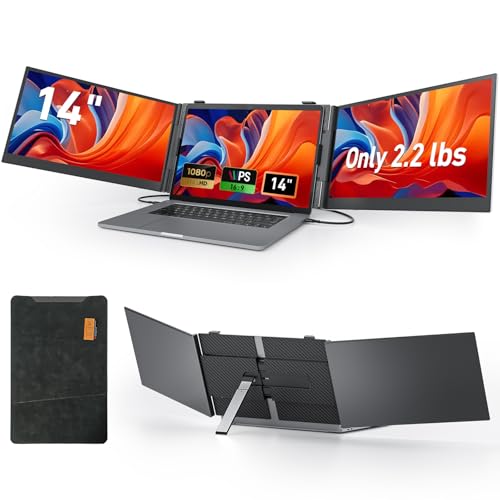
Vixtan Triple Monitor Review Summary
If your laptop workflow constantly runs out of space, the Vixtan 14-inch Triple Portable Monitor is one of the more practical ways to add serious screen real estate without turning your bag into a desktop replacement.
It is especially appealing to remote workers, travelers, traders, students, and light creative users who want a multi-window setup they can fold away and carry.
The big appeal is obvious: it turns a single laptop into a portable three-screen workstation.
That makes it easier to monitor chats, spreadsheets, code, timelines, dashboards, and reference documents at the same time.
The panel quality is solid for the category, the aluminum build feels more premium than many budget extenders, and the included stand helps stabilize the whole assembly better than flimsy clip-on designs.
Still, this is not a perfect grab-and-go gadget.
The lack of an internal battery and the need to manage cables and power means it is portable, but not fully carefree.
Mac users also need to pay closer attention to compatibility details.
In short, the Vixtan 14-inch Triple Portable Monitor is best for buyers who value workflow efficiency more than minimal setup.
Scorecard
| Category | Score | Why It Matters |
|---|---|---|
| Portability | 9.0/10 | Very thin, relatively light, and designed for travel, remote work, and on-the-go laptop use. |
| Screen expansion | 10.0/10 | Adds three displays to a laptop workflow, making multitasking and window management much easier. |
| Display quality | 8.0/10 | Uses a 14-inch IPS panel with 1080p resolution, good brightness, wide viewing angles, and full sRGB coverage. |
| Compatibility | 8.0/10 | Supports Windows, Mac, Chrome OS, Android, and multiple connection paths, though some Mac setups need a specific cable and driver. |
| Setup and connectivity | 7.0/10 | Plug-and-play is a plus, but users may need to manage cable and power requirements depending on the laptop and display mode. |
| Stability and stand design | 8.0/10 | Includes an adjustable aluminum stand with height adjustment and 180-degree rotation for steadier positioning. |
| Power convenience | 6.0/10 | It does not have an internal battery and may require external power for proper operation, which reduces true grab-and-go convenience. |
Verdict: If your buying goal is to unlock a mobile multi-monitor workflow, the Vixtan 14-inch Triple Portable Monitor makes a strong case for itself.
It is best for buyers who can handle a few cables in exchange for a big productivity gain.
Key Features and Specifications of Vixtan Triple Monitor
The spec sheet is where the Vixtan unit starts looking like a serious work accessory rather than a novelty.
Here is the core hardware buyers should care about.
| Spec | Detail |
|---|---|
| Screen size | 14 inches |
| Display type | IPS LCD |
| Resolution | 1920 x 1080 FHD |
| Aspect ratio | 16:9 |
| Refresh rate | 60 Hz |
| Brightness | 300 nits |
| Contrast ratio | 1000:1 |
| Viewing angle | 178 degrees |
| Color gamut | 100% sRGB |
| Response time | 2 ms |
| Body material | Aerospace-grade aluminum |
| Profile | 0.18-inch ultra-thin design |
| Weight | About 2.2 lbs |
| Rotation | 0 to 180 degrees horizontal |
| Compatibility | Windows, Mac, Chrome OS, Android, and more |
| Power | No built-in battery; requires laptop USB or external power |
| External power guidance | 5V/2A or higher |
| Included accessories | Type-C cables, USB-C to USB-A cable, HDMI cable, H5-T cable, carry bag, leather case |
From a buyer’s perspective, the strongest design choices are the FHD IPS panel, the 100% sRGB coverage, and the aluminum chassis.
Those are not features you usually associate with cheap screen extenders, and they matter because this product is meant to be used every day, not only for occasional travel.
The 14-inch size is also a smart middle ground.
It is large enough to make spreadsheets, chats, and documents useful, but not so large that it overwhelms a laptop setup.
For a lot of people, that balance is exactly what a portable second and third display should deliver.
Pros and Cons of Vixtan Triple Monitor
Understanding the Vixtan 14-inch Triple Portable Monitor pros and cons is the fastest way to know whether it fits your routine.
| Pros | Cons |
|---|---|
| Adds three screens without a bulky desktop setup | No internal battery, so it is not fully untethered |
| Extremely portable for a multi-monitor device | Some Mac setups require a specific cable and driver |
| Good FHD IPS image quality for productivity and casual creative work | May need external power to avoid no-signal issues |
| Wide compatibility across major operating systems | Glossy screen can reflect light in bright rooms |
| Adjustable stand and rotating screen improve usability | Setup can feel cable-heavy compared with a single portable monitor |
| Includes several cables and a carry case for travel | Not ideal for users who want the simplest possible plug-and-play experience |
The pros are centered on workflow efficiency, display expansion, and travel-friendly design.
The cons mostly come down to the reality of portable multi-monitor hardware: more cables, more power considerations, and more compatibility checks than a standard monitor.
That trade-off is reasonable if you truly need multiple screens.
It is less attractive if you only want a casual second display and do not care about triple-screen productivity.
Who Should Buy Vixtan Triple Monitor?
The Vixtan 14-inch Triple Portable Monitor is a smart buy for people who already know they need more screen space.
It is especially well suited to remote workers, consultants, traders, coders, analysts, content editors, and students who move between home, office, and travel setups.
It also fits buyers who like structured workspaces but do not want a permanent external monitor at every location.
If you frequently use a laptop in hotels, client offices, co-working spaces, or shared environments, this can be a real productivity multiplier.
You should probably buy it if:
- You want a portable triple-monitor setup for your laptop.
- You regularly multitask across several apps and windows.
- You value portability but still want a premium-feeling chassis and stand.
- You are comfortable managing power and cable connections.
You should probably skip it if:
- You want a fully battery-powered portable display.
- You need the simplest possible setup with almost no troubleshooting.
- You work in very bright spaces and strongly prefer a matte screen.
- You only need one extra screen instead of three.
How the Triple-Screen Setup Changes Daily Workflow
This is the category where the Vixtan model can feel genuinely transformative.
A triple-screen extender changes how you work because it reduces the need to constantly switch tabs.
For many buyers, that alone justifies the product.
In practical terms, one screen can hold your main task, another can keep reference material, and the third can handle communication, monitoring, or tool palettes.
That is particularly useful for financial traders, project managers, video editors, streamers, and spreadsheet-heavy users.
The key benefit is not simply “more screens.” It is less interruption.
Your brain spends less time reloading context when you can keep everything visible at once.
If you have ever felt slowed down by alt-tabbing, this product aims directly at that pain point.
There is also a productivity difference between this and a basic single portable monitor.
One extra screen helps, but three screens can be a full workflow redesign for people whose jobs involve constant comparison, monitoring, or cross-referencing.
Compatibility with Windows, Mac, Chrome OS, and Android
Compatibility is one of the biggest purchase factors here, and Vixtan does a good job of covering mainstream platforms.
The monitor extender supports Windows, Mac, Chrome OS, Android, and more, which gives it broad appeal for mixed-device households and hybrid workers.
That said, buyers should not assume every laptop will work the same way.
The product notes indicate that some Mac M1/M2/M3 setups may require the H5-T cable and a driver.
That is not unusual for portable multi-monitor products, but it does mean Mac users should verify their exact port configuration before ordering.
Windows users are likely to have the smoothest experience overall, especially if their laptop has the right full-featured USB-C or HDMI support.
Chrome OS and Android compatibility make this more versatile than many rivals, but those platforms can also vary in output behavior depending on the device.
Important buyer tip: if your laptop has only basic USB-C charging and no video output, you may run into limitations.
Always confirm that your device supports the necessary display signal before buying.
Display Quality for Work, Media, and Design
The display itself is one of the strongest selling points in the Vixtan 14-inch Triple Portable Monitor review.
The screen uses an IPS panel with 1920 x 1080 resolution, 300 nits brightness, and 100% sRGB coverage.
Those are respectable numbers for a portable monitor aimed at productivity.
For everyday office tasks, the image should look crisp enough and the wide 178-degree viewing angle helps when you tilt the screens or use them in less rigid positions.
The 60 Hz refresh rate is fine for general work and most casual media use, though it is not a gaming-first specification.
The 2 ms response time and HDR-enhanced marketing language suggest a sharper, more responsive feel than you might expect from a portable extender.
Still, buyers should view this as a productivity and light creative display, not a professional reference monitor.
It is useful for design layouts, content editing, and preview work, but not the same as a color-critical studio panel.
The glossy finish is worth noting.
Glossy panels often look a bit punchier indoors, but they can also reflect lights in bright office spaces.
If you work near windows or in harsh overhead lighting, that is one of the clearest compromises with this model.
What Comes in the Box and How It Powers On
One advantage here is that the accessory bundle looks genuinely useful.
The package includes Type-C cables, a USB-C to USB-A cable, HDMI cable, H5-T cable, a carry bag, and a leather case.
For a product designed to travel, that matters a lot because it reduces the chance that you will need to hunt down extra accessories just to get started.
The power story is more mixed.
There is no built-in battery, so the monitor extender must be powered by your laptop USB connection or an external adapter.
Vixtan recommends 5V/2A or higher for external power.
That is useful to know because some “no signal” complaints with portable monitors come from underpowered setups rather than bad screens.
From a usability standpoint, this means the Vixtan is best treated as a semi-portable workstation tool.
You can move it easily, but you still need to plan for cable management and power delivery.
For many buyers, that is an acceptable trade for a triple-screen setup.
For others, it will be a dealbreaker.
Bottom line: the box contents are generous, but the setup rewards users who are comfortable with a little technical housekeeping.
Travel Use, Desk Stability, and Carry Case Notes
The travel side of this product is one of its strongest arguments.
At about 2.2 lbs and just 0.18 inches thick, the Vixtan 14-inch Triple Portable Monitor is clearly designed for mobility.
The included premium drop-proof leather case and protective carry bag also add confidence for frequent movers.
In real-world use, the widened aluminum stand and multi-level height adjustment are important because triple-screen attachments can become wobbly fast if the support system is weak.
The 180-degree horizontal rotation also gives you more flexibility when positioning the panels around your laptop.
That said, users should still be realistic.
A triple-screen portable monitor is never going to feel as simple as opening a laptop lid.
Desk stability will depend on the laptop’s hinge strength, your workspace surface, and whether you are using the correct power and connection setup.
On a stable desk, it should feel controlled and usable; on a cramped tray table, it may be more awkward.
Best use case: home office, hotel desk, co-working space, or a travel workstation where you can set up once and work for several hours.
Vixtan Triple Monitor Compared with Alternatives
Before buying, it helps to think about the alternatives.
If you do not need three displays, a dual-screen portable monitor may be simpler and lighter.
If you only need one extra display, a single portable monitor with stand is easier to power and set up.
If you want maximum desk performance and do not care about mobility, a desktop USB-C monitor will usually be easier to live with.
For buyers specifically shopping the portable triple-monitor category, the main trade-off is often between portability and convenience.
The Vixtan leans toward portability and feature density.
Some other portable extenders may be lighter in feature set but easier to power, while higher-end triple-monitor attachments may offer more polish at the cost of a bigger price and heavier build.
If you are comparing options, ask yourself these questions:
- Do I need three screens, or would one extra display be enough?
- Will I use this mostly at a desk, or genuinely while traveling?
- Does my laptop fully support the needed video output?
- Am I comfortable with cables, adapters, and driver steps if needed?
Those answers matter more than flashy marketing language when choosing this kind of accessory.
Is Vixtan Triple Monitor Worth It?
So, is Vixtan 14-inch Triple Portable Monitor worth it?
For the right buyer, yes.
It is worth considering if you want a serious productivity boost in a portable format and you are willing to handle a bit of setup complexity.
The main strengths are clear: three-screen expansion, FHD IPS quality, strong portability, broad compatibility, and a sturdier aluminum stand than many rivals.
Those features make it especially attractive to people whose work genuinely improves with more visible information at once.
The main drawbacks are just as clear: no internal battery, possible power dependency, some Mac setup friction, and a glossy panel that may reflect light.
If those issues sound manageable, the product offers real value.
If you want a dead-simple accessory with no cables or compatibility concerns, you will probably be happier elsewhere.
Final verdict: the Vixtan 14-inch Triple Portable Monitor is a smart buy for mobile power users who want laptop-based multi-monitor productivity without building a full desktop station.
If that describes your workflow, this is one of the more compelling options in its class.
Buying advice: choose it if you need maximum screen space on the road and your laptop ports are compatible.
Skip it if you want the easiest possible plug-and-play monitor or you need battery-powered freedom.